Crafting the Perfect Email Subject Line
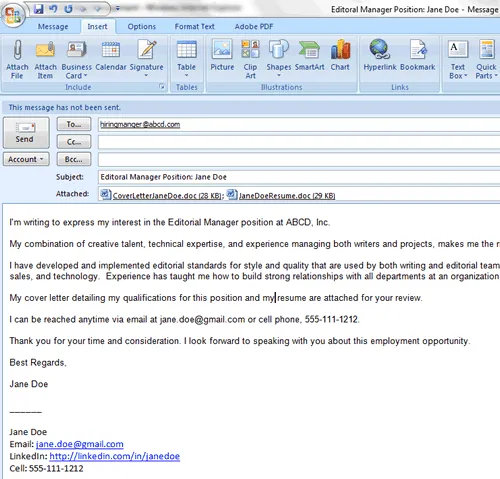
Your email subject line is the first impression you make on a potential employer, so it’s crucial to get it right. A well-crafted subject line increases the chances of your email being opened and read. It should be concise, clear, and professional. Avoid generic phrases like “Job Application” and instead, use something specific that grabs the reader’s attention. Highlighting the position you are applying for, along with your name, ensures that the hiring manager knows immediately what the email is about. This simple step can significantly increase your chances of your application being noticed in a crowded inbox. Remember, the subject line sets the tone for the entire email and can influence the recipient’s perception of your application.
Why the Subject Line Matters
The subject line serves as a gatekeeper, determining whether your email gets opened in the first place. Hiring managers often receive hundreds of applications, and a compelling subject line helps your email stand out. It provides immediate context and tells the recipient what the email contains. A vague or unprofessional subject line can lead to your email being overlooked or, worse, deleted. A clear and relevant subject line also helps the hiring manager quickly identify the purpose of the email, making it easier to manage their inbox. A well-written subject line shows that you pay attention to detail and understand the importance of effective communication. This attention to detail is a positive reflection on your professionalism and increases the likelihood of your application being seriously considered.
Best Practices for Subject Lines

To create a compelling subject line, start with the job title and your name. For example, “Software Engineer Application - John Doe.” If the job posting provides specific instructions, follow them to ensure your application is properly routed. Avoid using all caps or excessive exclamation points, as this can appear unprofessional. Keep it concise – aim for under 60 characters to ensure it displays correctly on all devices. Always proofread the subject line for any typos or errors. A polished subject line demonstrates your professionalism and attention to detail. If you are responding to an advertisement, always reference the job ID or posting number, if provided, in the subject line.
Formatting Your Cover Letter Email Body
The body of your cover letter email is where you introduce yourself and highlight your qualifications. Keep it brief, professional, and easy to read. Start with a polite greeting, addressing the hiring manager by name if possible. In the first paragraph, state the position you are applying for and where you saw the job posting. In the following paragraphs, summarize your key qualifications and experiences that align with the job requirements. This is not the place to re-write your entire cover letter; instead, provide a concise overview. End with a call to action, expressing your enthusiasm for the opportunity and your availability for an interview. Make sure to thank the hiring manager for their time and consideration.
The Importance of a Professional Tone
Maintain a professional tone throughout the email body. Use formal language and avoid slang, jargon, or casual expressions. Ensure your writing is clear, concise, and grammatically correct. Proofread the email carefully to catch any errors in spelling or punctuation. Avoid using emojis or informal greetings. Your email represents you as a professional, so it should reflect a high standard of communication. A professional tone demonstrates your respect for the hiring manager and the company. Always use a professional email signature, including your full name, phone number, and LinkedIn profile link. This provides easy access to your contact information and professional background. It also shows you are serious about your career and are ready for business.
Concise and Engaging Content

Keep your email concise and to the point. Hiring managers are busy and appreciate brevity. Get straight to the point and avoid unnecessary details. Focus on the most relevant information and highlight your key qualifications. Use short paragraphs and bullet points to improve readability. Engage the reader by showcasing your enthusiasm for the position and the company. Tailor your content to the specific job requirements and explain why you are a good fit. Mention any unique skills or experiences that make you stand out. A well-written, engaging email shows that you have taken the time to understand the job and the company’s needs. It increases your chances of making a positive impression and securing an interview. Remember that the email body is a preview; the full cover letter and resume offer more detail.
Attaching Your Cover Letter & Resume
Attaching your cover letter and resume correctly is a critical step. Always attach your cover letter and resume as separate documents. This allows the hiring manager to easily download and review each document. Never paste your cover letter or resume directly into the email body unless specifically requested. This can make the documents difficult to read and format. Ensure that the attachments are in a professional format, such as PDF. This ensures that the formatting remains consistent across different devices and operating systems. Verify that both files are included and that they open correctly before sending the email. This simple check can prevent significant embarrassment. Always clearly label each attachment, such as “JohnDoe_CoverLetter.pdf” and “JohnDoe_Resume.pdf”.
File Formats and Naming Conventions
Use PDF format for your cover letter and resume. PDF (Portable Document Format) preserves the formatting of your documents, ensuring they look the same regardless of the recipient’s device. Avoid using Word documents (.doc or .docx) unless specifically requested, as these can sometimes display incorrectly. Use a clear and professional file naming convention. Include your name and the document type in the file name. For example, “JaneSmith_CoverLetter.pdf” and “JaneSmith_Resume.pdf.” Avoid using generic file names like “coverletter.pdf” or “resume.pdf” as they can get lost in the hiring manager’s downloads. Properly naming your files helps the recipient organize and identify your documents. Always double-check your attachment to ensure the correct documents are attached before sending. This simple step can save you from potential embarrassment and improve your chances.
Previewing Your Email Before Sending

Before sending your email, always preview it to ensure everything looks correct. Open your email in a draft mode to see how it appears before it is sent. Check the subject line, email body, and attachments to ensure they are all in order. Verify that the formatting is correct and that the attachments are included. Send a test email to yourself or a friend to see how it renders on a different device or email client. This can help you identify any potential formatting issues or errors. Check that all links and contact information are correct. A thorough preview minimizes the risk of errors and helps you make a positive impression. This also gives you the opportunity to correct any mistakes before the email goes to the hiring manager. Taking a few extra minutes to preview your email can significantly boost your chances.
Proofreading for Errors
Proofreading is an essential step in the email cover letter process. Errors in spelling, grammar, or punctuation can undermine your professionalism and decrease your chances of getting noticed. Carefully read through your email and cover letter multiple times to catch any mistakes. Use a spell checker and grammar checker, but also manually review your work. Read your email aloud to help catch any awkward phrasing or sentence structures. Ask a friend, family member, or career advisor to review your email for additional feedback. Fresh eyes can often spot errors you may have missed. A polished and error-free email demonstrates attention to detail and respect for the hiring manager’s time. Proofreading is a final opportunity to ensure your application reflects you and your qualifications in the best possible light. This attention to detail can make a difference between your application and another, more refined one.
Sending Your Email and Following Up
Once you are confident that your email is perfect, you can send it. Double-check the recipient’s email address to ensure you’re sending it to the correct person. After sending, consider following up with the hiring manager to reiterate your interest in the position and confirm they received your application. A follow-up email a week after sending can demonstrate your enthusiasm. If you do follow up, keep it brief and professional. Reference the position and the date you sent your application. Thank the hiring manager again for their time. If the hiring manager has provided a deadline for application, respect it. Avoid sending follow-up emails before the deadline. By following these steps, you increase your chances of making a strong impression and successfully landing an interview.